
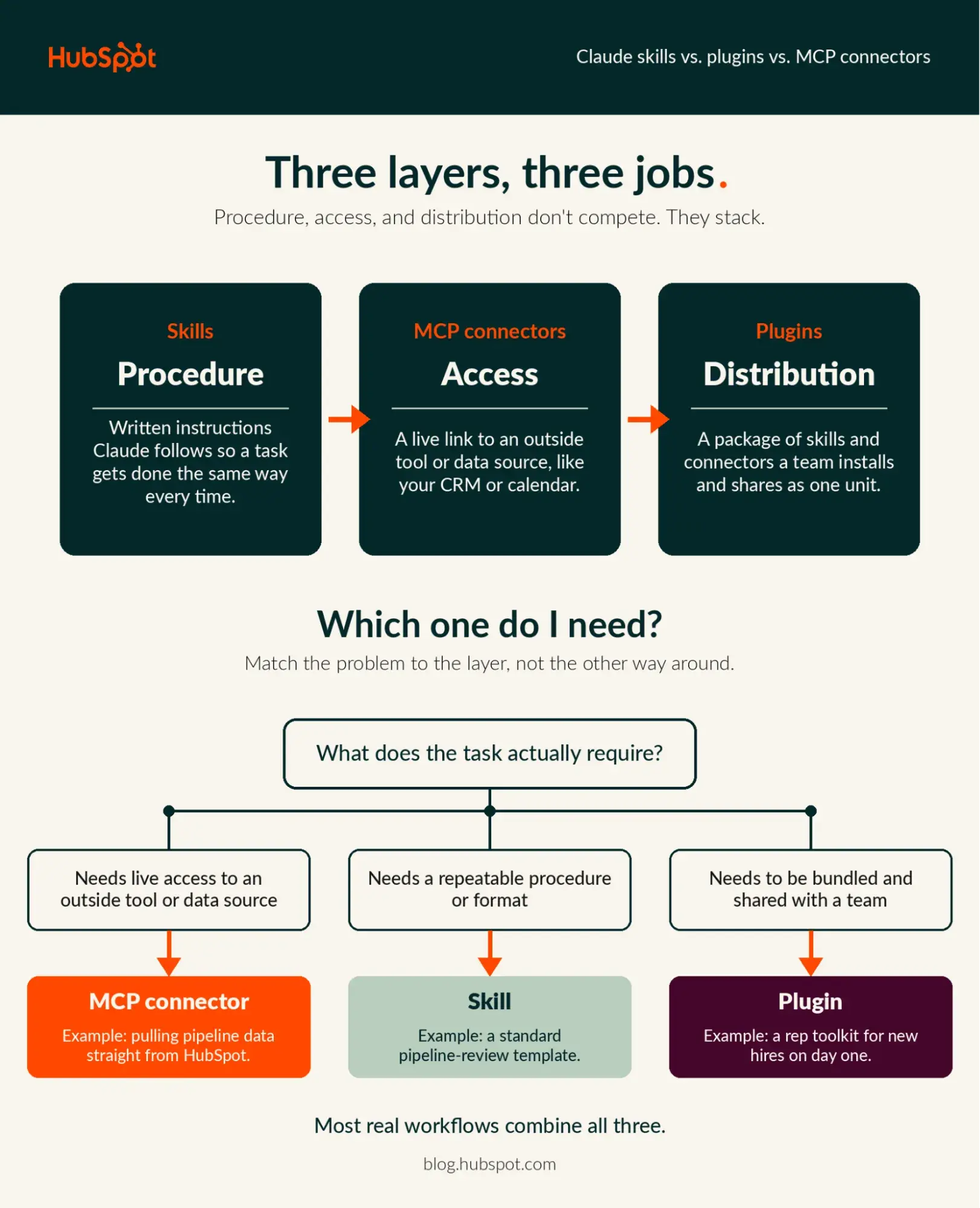
For many professional users, the "Customize" settings menu in Claude can feel like navigating a workshop filled with high-tech tools that all look remarkably similar. If you have ever stared at your screen wondering whether your workflow requires a Skill, a connector, or a Plugin, you are certainly not alone. While these terms are frequently used interchangeably in casual office conversation, they serve distinct, architectural purposes within the Anthropic ecosystem.
To unlock the true potential of AI-assisted productivity, one must stop viewing these as competing features and start seeing them as layers of an integrated stack. This guide dissects the "Access, Procedure, and Distribution" framework, offering a clear roadmap for building sophisticated, reliable workflows.
The Three Pillars: Understanding the Architecture
The most effective way to demystify these tools is to categorize them by their specific contribution to an AI-driven task. Think of it as a hierarchy of operational logic:
1. MCP Connectors: The "Access" Layer
Model Context Protocol (MCP) connectors are the bridge between Claude’s internal intelligence and the external world. An MCP server allows Claude to interface with third-party services—such as your CRM, project management software, or cloud storage—using live data. Crucially, these connectors operate within your existing security permissions; if you don’t have access to a folder in your organization’s drive, Claude won’t be able to "see" it through the connector, either.
2. Skills: The "Procedure" Layer
If the connector provides the data, the Skill provides the "how." A Skill is essentially a curated set of instructions, logic, and reference materials. It tells Claude exactly how to interpret information and in what format to deliver results. A Skill defines your brand voice, your company’s unique report structure, or the specific checklist used during a project review. A Skill can guide Claude on how to manipulate data retrieved by a connector, but it cannot reach out to external servers on its own.
3. Plugins: The "Distribution" Layer
Plugins are the delivery mechanism. They bundle Skills, MCP connectors, commands, and sub-agents into a single, cohesive package. Instead of requiring every team member to manually install a connector and then upload a specific Skill file, an administrator can package everything into a single Plugin. This allows for seamless, one-click deployment across an entire organization.
Chronology of a Workflow: From Manual Task to Automated Routine
To understand how these pieces fit together, consider a standard, high-friction task: the weekly sales pipeline review.
Phase 1: The Manual Baseline
Initially, a sales manager spends an hour every Monday morning logging into their CRM, copying deal stages, noting recent activity, and drafting a summary email. This is the "pre-automation" phase where the process exists only in the employee’s head.

Phase 2: The Connector Integration
The manager installs an MCP connector (like the HubSpot connector for Claude). Now, Claude can pull live data from the CRM. However, without further guidance, Claude might present the data in a generic, unhelpful format.
Phase 3: The Skill Implementation
The manager creates a "Skill" file. This file contains the team’s specific "Pipeline Review SOP," including rules like "only flag deals that have been stagnant for more than 10 days" and "use a bulleted list for action items." Claude now has both the data (from the connector) and the procedural intelligence (from the Skill) to perform the task perfectly.
Phase 4: The Plugin Distribution
The manager realizes the entire team could benefit from this. Instead of teaching every rep how to set up the connector and upload the text-based Skill, the manager bundles these into a "Weekly Pipeline Review Plugin." They share it with the team, and in one click, the entire department is standardized.
Supporting Data and Industry Implications
The trend toward "AI orchestration" is no longer theoretical. Recent data suggests that over 50% of enterprise users are already utilizing multiple Large Language Models (LLMs) to manage their workflows. This fragmentation makes the need for consistent, reliable "connectors" more critical than ever.
The Power of Integration
Research indicates that teams who standardize their workflows through centralized tools—rather than relying on individual "prompt engineering"—see a 40% reduction in "AI hallucination" or formatting errors. By using a Skill to enforce a rigid output format, companies remove the variability inherent in generative AI.
Security and Governance
Anthropic has structured this ecosystem with the enterprise in mind. The "Access" layer (MCP) is built on a permission-first architecture. If a user is restricted from viewing sensitive financial data in their native CRM, the Claude connector will respect those boundaries. Furthermore, for Enterprise-grade deployments, audit logs provide a clear trail of how and when these tools are being accessed, allowing for compliance with rigorous internal security standards.
Official Guidelines: Best Practices for Implementation
When deploying these tools, it is tempting to jump straight to the most complex solution. Anthropic and industry experts recommend a more measured approach.
Start Small
Begin by automating a single, repeatable, low-stakes task. Do not attempt to build a "master plugin" that handles your entire department’s workflow on day one. Verify that your Skill instructions are robust before moving to the distribution phase.

Test, Then Deploy
Anthropic’s "skill-creator" tools allow users to run test prompts against a new Skill. You should always stress-test your instructions against edge cases—what happens if the CRM data is missing? What if the input is messy? Only after these tests pass should you share the plugin with your team.
The Role of Governance
- Permissions: Use the "Always Allow" or "Needs Approval" settings on connectors to maintain a "human-in-the-loop" requirement for critical actions.
- Version Control: For Team and Enterprise plans, treat Plugins like software. Use version history to track changes, and ensure that only authorized admins have the power to push updates to the organization-wide package.
- Audit Logs: Utilize the Compliance API to pipe logs into your existing SIEM (Security Information and Event Management) tools. This ensures that your use of AI remains transparent and auditable.
Implications for Future Workflows
The distinction between these three layers marks a maturation of the AI industry. We are moving away from the era of "chatting with a chatbot" and into the era of "orchestrating AI agents."
As companies begin to treat Skills and Plugins as corporate assets—no different than a custom Excel macro or a proprietary software module—the competitive advantage will go to those who can build the most efficient "procedural" libraries.
Why This Matters
If you are a marketing team, your "Skill" might be a brand voice guideline. If you are a service team, your "Skill" might be a ticket resolution protocol. By standardizing these via Plugins, you eliminate the "knowledge silos" that occur when only one person knows how to "prompt" the AI correctly.
The future of work is not just about having the smartest AI; it is about having the best-governed, most reliable, and most accessible AI ecosystem. Whether you are building a simple connector to your CRM or a complex, multi-functional plugin for your entire sales organization, the goal remains the same: spend less time on the process, and more time on the insights that the process provides.
Pro-Tip: If you are unsure where to begin, start by identifying the task you find most tedious. Find a connector that links to the data you need, define the process you use to complete it, and watch as your "manual" work transforms into a single, automated click.