
In the fast-paced world of digital marketing, waiting hours for a site-wide crawl to finish is often a luxury you cannot afford. When a product page suddenly dips in search rankings, a competitor outranks your high-value landing page, or a client reports a slump in conversions, you need immediate, actionable intelligence.
The most effective way to bridge the gap between "something is wrong" and "here is how we fix it" is through a rapid, page-level diagnostic process. Using the SEOquake Chrome extension, SEO professionals can perform a comprehensive triage and diagnosis of any webpage in just three minutes. This article outlines the systematic workflow for identifying technical, structural, and content-related SEO friction points without ever leaving your browser.

Understanding the Diagnostic Toolset: What is SEOquake?
SEOquake, developed by Semrush, is a powerful, free browser extension that serves as a diagnostic powerhouse for on-page SEO. It provides immediate visibility into the technical signals, on-page optimization, linking strategies, and authoritative metrics that dictate how a search engine views a specific URL.

By installing the extension and clicking the icon on any page, you gain access to a real-time data layer that would otherwise require deep dives into Google Search Console or complex crawling software. The tool uses a color-coded reporting system—green for optimal, orange for warnings, and red for critical issues—to help users prioritize their efforts immediately.

The Three-Minute Workflow: A Chronological Approach
Efficiency is the cornerstone of effective SEO auditing. To maintain focus, this workflow is divided into two distinct phases: Triage (Minute One) and Diagnosis (Minutes Two and Three).

Minute One: Triage via the Quick View Pop-Up
The first 60 seconds are dedicated to answering a single, fundamental question: "Is there an obvious barrier preventing this page from performing?"

When you open the SEOquake Quick View pop-up, you are presented with five primary tabs. To conduct a rapid assessment, focus your attention on the Page Info, Audit, and Content tabs. Dedicate roughly 20 seconds to each.

- Page Info: Start here to verify the health of the core SEO pillars. Check your Title Tag, Meta Description, canonical URLs, and the presence of any critical indexing tags (such as
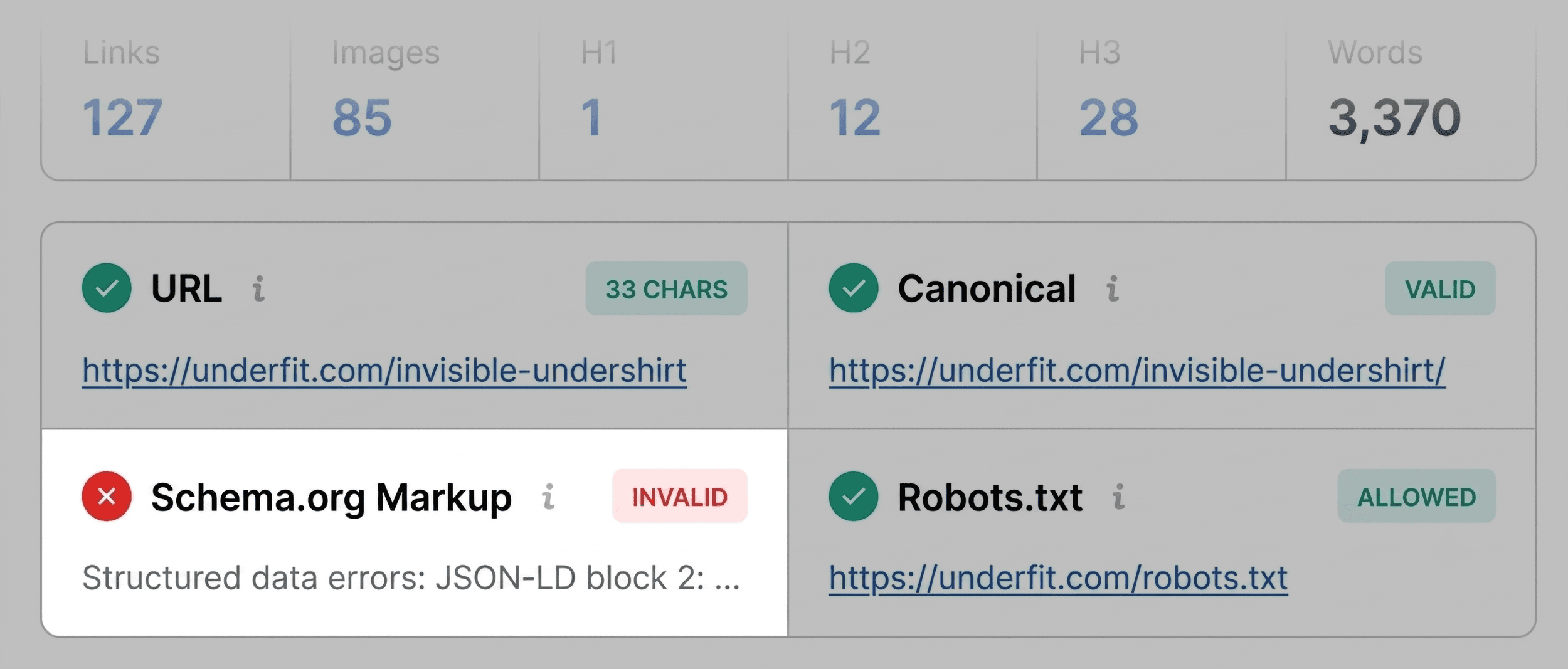
noindex). - Audit: Transition to this tab to scan for technical red flags. This includes SSL/HTTPS status, mobile-friendliness, and critical server errors. If an element is marked in red, it is likely an immediate blocker for search engine crawlers.
- Content: Finally, evaluate the structure. Check the hierarchy of your H1 through H6 tags. A fragmented header structure or the absence of alt text on images can significantly impact accessibility and search engine interpretation.
Minutes Two and Three: Diagnosis via the Full Report
Once you have identified the "low-hanging" issues during triage, the next two minutes should be spent using the Full Report to uncover the root cause. Click "View Full Report" to open the detailed interface, which contains six specialized panels: Summary, Diagnosis, Density, Internal/External Links, Social, and Semrush.

By navigating to the specific panels corresponding to the red or orange flags found during triage, you can assess the severity of the issue. For example, if the triage flagged a Schema error, the Audit panel will allow you to click through to the Google Rich Results Test. This immediate verification confirms whether your structured data is truly broken or simply misinterpreted by the tool.

Supporting Data: Why Granular Analysis Matters
The effectiveness of this workflow lies in its ability to isolate issues. For instance, if you are analyzing a product page, missing alt text on 36 images might seem like a minor oversight. However, in the context of an e-commerce site, these images are critical for conversion and accessibility. The SEOquake "Links" panel allows you to export this data to a CSV, turning a vague "image issue" into a concrete list of tasks for your web development team.

Furthermore, the Keyword Density panel provides a reality check on your content strategy. While keyword stuffing is a relic of the past, seeing which terms appear most frequently in your H1s, titles, and body copy ensures that your page is contextually relevant to the search intent you are targeting. If "zoom zoom" or other UI-related text appears as a top keyword, it serves as a reminder that the search engine is indexing more than just your carefully crafted product descriptions.

Implications for Site-Wide Strategy
One of the most important aspects of this audit is determining the scope of the fix. After identifying an issue, ask yourself: Is this an isolated incident, or is it systemic?

- Page-Level Issues: Missing alt text, a single broken link, or a slightly off-topic meta description can be corrected directly on the page.
- Site-Wide Issues: If you encounter widespread XML sitemap errors or inconsistent Schema markup across multiple product pages, this indicates a template or configuration issue.
When the diagnosis reveals a site-wide problem, the three-minute page audit has successfully done its job: it has prevented you from wasting time on a "band-aid" fix and signaled the need for a full site crawl using more robust tools like the Semrush Site Audit.

Official Guidance and Best Practices
Industry standards for SEO have evolved significantly, placing higher importance on technical health and user experience. As noted in Semrush’s internal guidelines for SEO professionals, the goal of any audit is to reduce technical debt.

When conducting these audits, keep the following priorities in mind:

- Accessibility First: If a search engine cannot crawl or parse your page, your content quality becomes irrelevant.
- Schema Accuracy: With the rise of AI-driven search, structured data is no longer optional. Ensure your JSON-LD is valid and properly nested.
- Hierarchy Matters: Proper header structure (H1 -> H2 -> H3) acts as a roadmap for search engines. Never sacrifice logical structure for visual design.
Conclusion
The ability to diagnose a webpage in three minutes is a superpower for the modern SEO specialist. By moving systematically from a high-level triage to a focused, data-backed diagnosis, you can maintain control over your site’s performance and respond to market changes with agility.

Whether you are identifying a simple missing alt tag or discovering a complex template-wide Schema error, the SEOquake workflow ensures that you remain proactive rather than reactive. As search algorithms continue to prioritize technical efficiency, tools that provide instant, transparent insights into the "mechanics" of a webpage will remain essential components of every digital marketer’s toolkit.

To start your journey toward more efficient auditing, install the SEOquake extension from the Chrome Web Store and begin by auditing your top-performing pages to establish a baseline of "what good looks like." From there, you will be well-equipped to tackle the performance gaps that arise across your entire digital presence.