
In the modern digital workspace, the "single-screen, single-device" paradigm is rapidly becoming a relic of the past. Whether you are a software developer testing code across multiple operating systems, a content creator managing a dedicated streaming PC, or an IT administrator troubleshooting a server rack, the need to interact with multiple machines simultaneously is a professional necessity.
In my previous column, I explored the sophisticated world of software-based solutions—tools that allow users to control two or more PCs with a single keyboard and mouse by routing inputs over a network. While these applications are elegant and often cost-effective, they are not without their vulnerabilities. Relying on local area network (LAN) stability or Wi-Fi connectivity can lead to latency spikes or dropped connections, particularly in office environments with complex firewall configurations or congested public networks.
For those requiring rock-solid reliability, hardware-based alternatives provide a robust path forward. These solutions circumvent network dependencies, offer superior security for sensitive environments, and can often function even before the operating system has fully initialized.
The Evolution of Input Switching: From Simple Switches to Intelligent Bridges
The landscape of hardware input control is divided into two primary camps: traditional physical switches and modern "intelligent" bridges.
The Baseline: Mechanical KVM Switches
At the entry level, we have the classic Keyboard-Video-Mouse (KVM) switch. These devices are the workhorses of the industry, allowing users to toggle a single set of peripherals between multiple host computers. While they are reliable, they come with significant trade-offs:

- The Switch Hurdle: Most require a manual button press or a remote control to transition between devices.
- Video Constraints: If your goal is to maintain distinct monitor signals for each PC, you must be careful; many KVMs are designed to multiplex video signals, which can cause monitor-detection issues if you are trying to keep both screens active simultaneously.
- Lack of Seamlessness: Unlike software solutions, you cannot simply drag your mouse cursor across a screen boundary to jump to the next computer.
The Specialized Hardware Landscape
To bridge the gap between "hard" switching and "soft" seamlessness, several manufacturers have developed specialized hardware. Foremost among these is J5Create, whose "Wormhole" product line has become synonymous with the category.
J5Create’s lineup is extensive, ranging from simple USB-A to USB-A bridge cables to complex docking stations. The core of their strategy involves a proprietary software layer that runs from an embedded volume within the cable. When both computers are connected, this software facilitates clipboard sharing and seamless cursor movement, mimicking the feel of a multi-monitor setup on a single PC.
However, the hardware path is not without its own set of technical caveats:
- Platform Compatibility: It is not uncommon to find that even within the same product line, support for Windows, macOS, and Linux varies. Users must carefully verify that their specific operating system mix is supported.
- Software Installation: Despite being hardware-based, many of these devices require that you install a driver or "handshake" application on both host machines. This can be a dealbreaker for secure corporate machines where administrative privileges are restricted.
Emerging Innovations: The "Wormhole" and Beyond
The industry is currently seeing a surge in "intelligent" hardware that aims to eliminate the friction points of older technology.
J5Create’s Aero Drop CrossLink
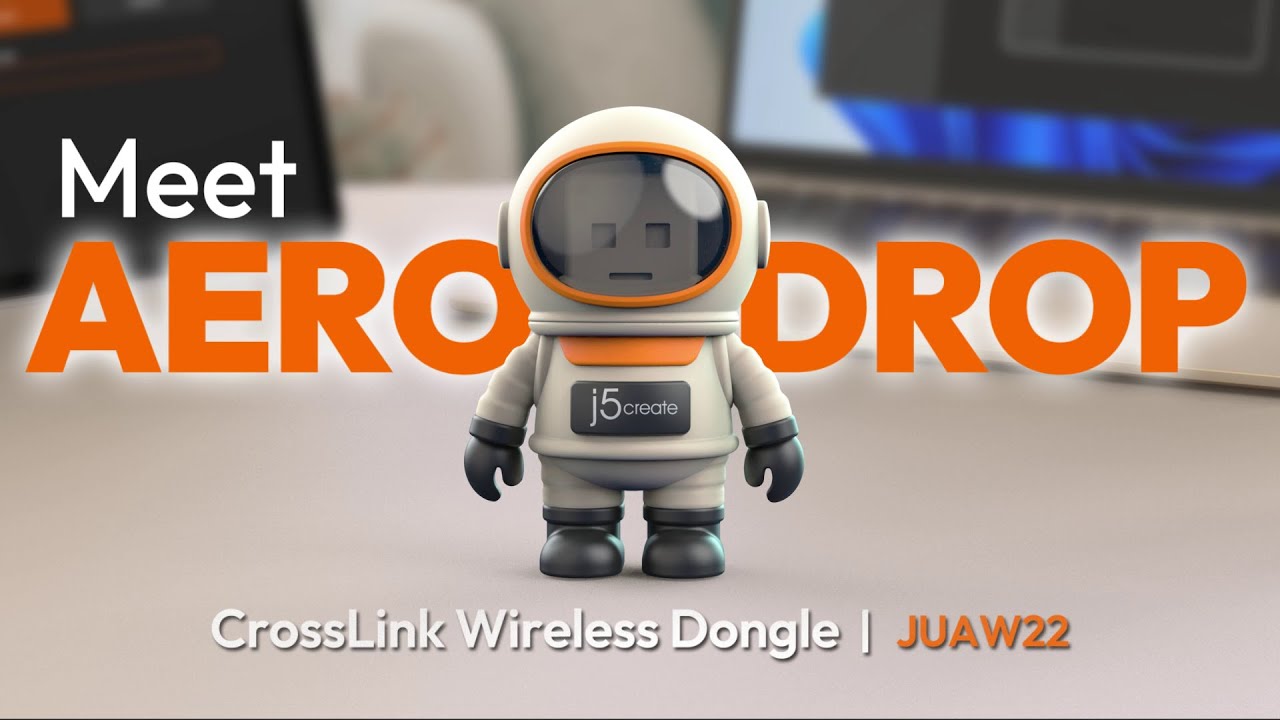
One of the most novel developments in this space is J5Create’s Aero Drop CrossLink. Encased in a whimsical astronaut-themed chassis, this device represents a shift toward mobile integration. It allows a keyboard and mouse connected to a Windows PC to control an iPhone, iPad, or Android device via Bluetooth. While it does not support PC-to-PC or Mac-to-PC connections, it highlights the industry’s recognition that the "multi-device" workflow now includes mobile ecosystems.

The Rise of Kickstarter Disruptors
The success of established firms has paved the way for niche, high-performance hardware developed through crowdfunding.
- Asuizo Crossys: This device streamlines the connection process by using permanently attached cables, minimizing cable clutter. Like its competitors, it relies on a software layer, but its "faceless" application for macOS is designed to run quietly in the background, minimizing the impact on system resources.
- LoopMotion: Perhaps the most intriguing entrant is the LoopMotion device, which distinguishes itself by being truly "plug-and-play." It is the only intelligent switch in the current market that requires zero software installation. By presenting itself as a standard HID (Human Interface Device) to the host machines, it circumvents the need for drivers, making it an excellent choice for users on Linux or restricted corporate environments.
Comparing the Approaches: A Chronological View of Integration
| Era | Technology | Primary Advantage | Primary Drawback |
|---|---|---|---|
| Pre-2010 | Mechanical KVM | Hardware-level, zero latency | Manual switching required |
| 2010-2020 | Network Software (Synergy) | Seamless, software-agnostic | Network dependency, lag |
| 2020-Present | Intelligent Bridge (LoopMotion) | No software, seamless feel | No touchpad support |
Supporting Data and Technical Realities
For the power user, the choice often comes down to specific feature sets. While Microsoft’s "Mouse without Borders" (part of the PowerToys suite) remains the gold standard for free, network-based Windows-to-Windows switching, it falls short when you introduce non-Windows hardware.
When evaluating these tools, consider the following performance metrics:
- Clipboard Synchronization: If your workflow involves constant copying and pasting between systems, ensure your chosen hardware supports shared clipboard buffers.
- Accessibility Permissions: For macOS users, any solution—hardware or software—will likely require deep system access. Ensure your IT policy permits these permissions before investing.
- Input Latency: In competitive gaming or high-frequency trading environments, even a few milliseconds of added latency can be catastrophic. Mechanical KVMs remain the superior choice for these specific use cases, as they offer near-zero input lag.
Implications for the Future of Work
The movement toward hardware-based input control is a direct response to the "fragility" of modern software ecosystems. As we become more reliant on distributed computing and cloud-integrated workflows, the ability to physically control our devices—independent of the network or the OS version—becomes a critical component of professional resilience.
We are seeing a convergence of these technologies. The future likely holds hybrid devices that combine the simplicity of a hardware KVM with the intelligent, software-like features of a bridge. Features like audio-sharing, drag-and-drop file transfers, and multi-protocol support (bridging Windows, macOS, Linux, and iOS/Android) will become standard expectations rather than "pro" features.
Conclusion: Finding Your Best Fit
If you are operating in a stable environment and primarily work within the Windows ecosystem, Microsoft’s Mouse without Borders is, and remains, the most efficient and cost-effective solution. Its integration into the PowerToys ecosystem ensures ongoing support and updates.
However, if your workflow demands cross-platform compatibility (macOS/Linux/Windows) or if you work in an environment where installing third-party software is prohibited, the LoopMotion represents the current pinnacle of "intelligent" hardware. Its ability to function without drivers makes it uniquely suited for the modern, locked-down professional machine.
Finally, for those who require the ultimate in reliability—such as those working in mission-critical server management—do not discount the classic mechanical KVM. Sometimes, the best way to bridge two computers is to rely on the simplest, most transparent physical connection available. By understanding the distinct strengths and weaknesses of these hardware tiers, you can build a workstation that is as fluid, fast, and reliable as your workflow demands.