
The landscape of personal computing is undergoing a tectonic shift, one where the browser has evolved from a simple window into the internet to a powerful, AI-driven operating system. In a move that signals a direct escalation in the ongoing “AI browser wars,” OpenAI has launched a significant update to its official ChatGPT Chrome extension. This update does more than just offer a chatbot in a window; it embeds the full capability of ChatGPT directly into the fabric of Google’s ubiquitous Chrome browser, creating a persistent, context-aware companion that operates across tabs and even manages website interactions on behalf of the user.
For OpenAI, this integration is a strategic maneuver to maintain its relevance in an ecosystem where Google is aggressively pushing its own AI, Gemini, to the forefront of the user experience. By making ChatGPT a seamless part of the browsing journey, OpenAI is effectively staking a claim on the browser, challenging the natural advantage Google holds as the provider of the platform itself.
The Core Functionality: A Persistent Digital Companion
At its heart, the new update transforms ChatGPT from a standalone website into an interactive sidebar that accompanies users as they navigate the web. Unlike traditional extensions that merely allow for quick text queries, this integration is designed for deep, cross-tab contextual awareness.
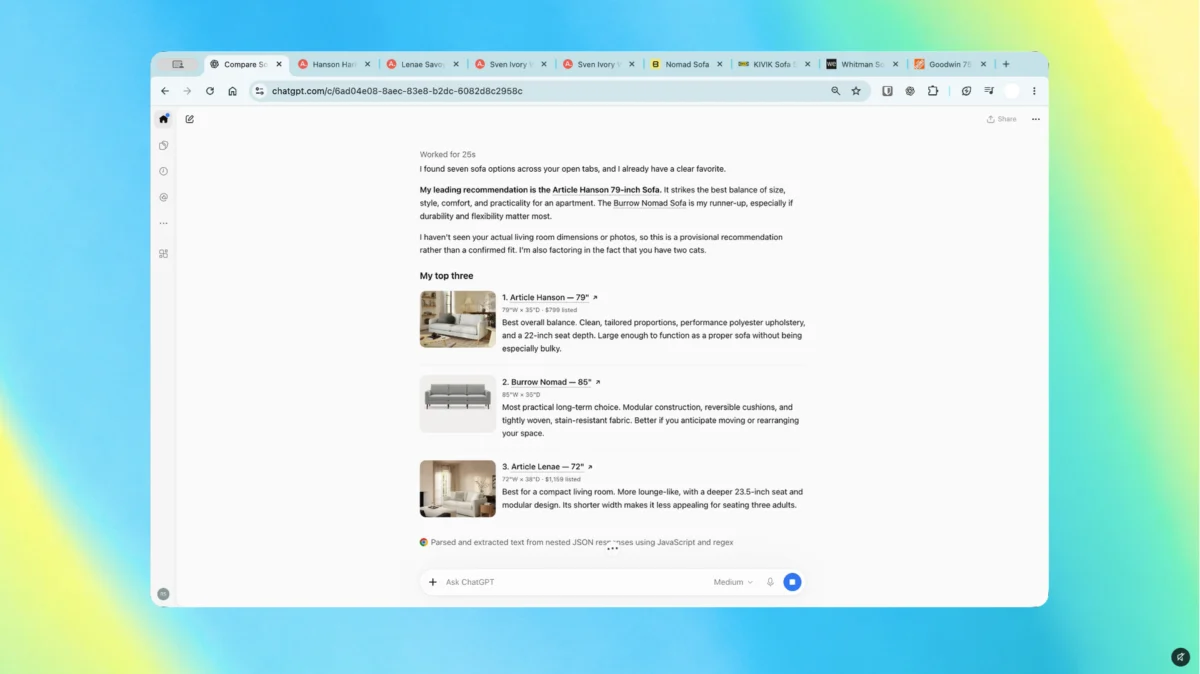
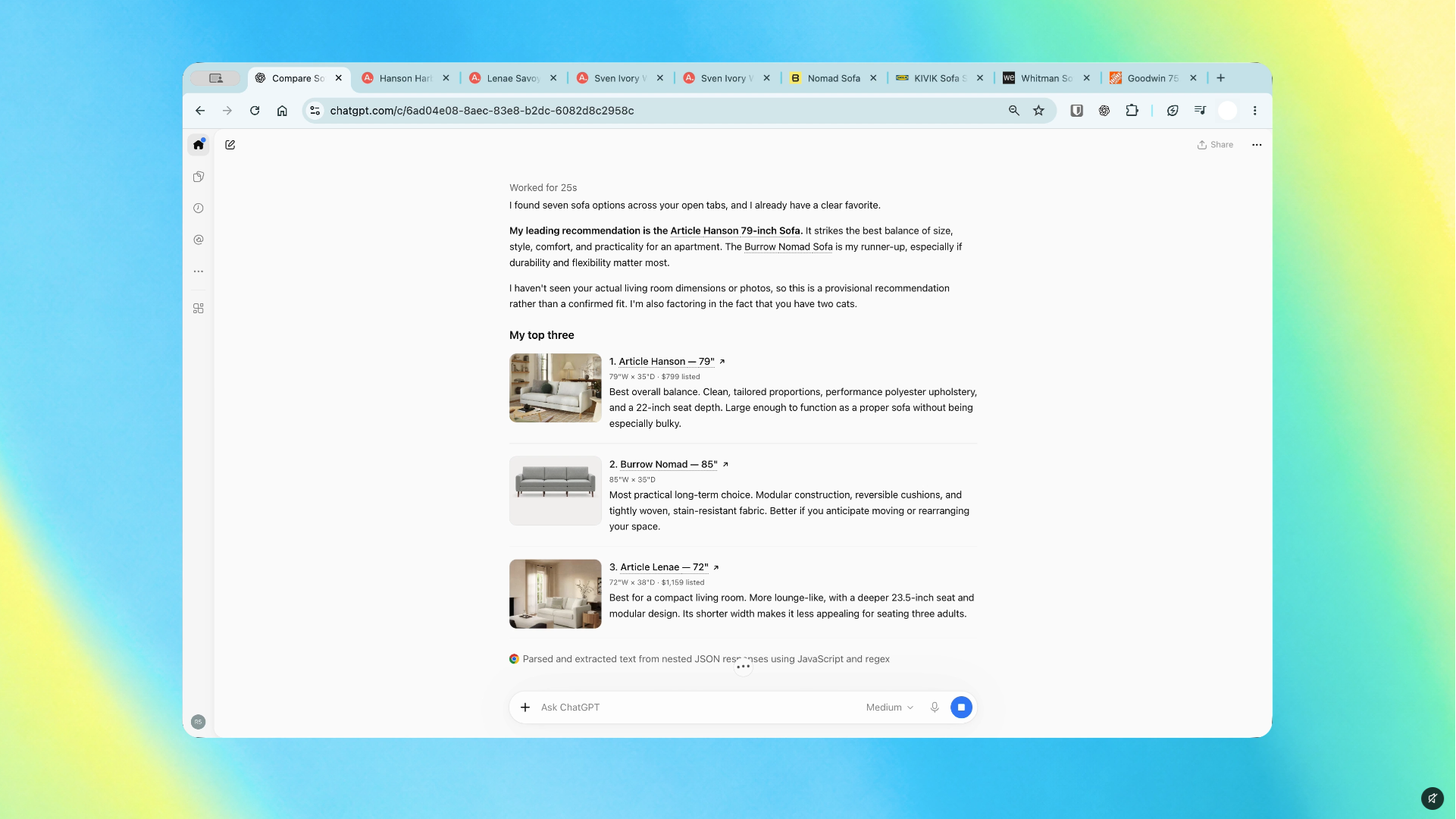
When enabled, the extension can "read" the content of your open tabs, allowing users to ask complex questions that synthesize information from multiple sources simultaneously. If a user is conducting research, they no longer need to manually copy and paste paragraphs into a separate ChatGPT window. Instead, the AI acts as a research assistant, analyzing the data points across various articles and providing a cohesive summary or comparison on the spot.
Beyond mere information gathering, the update introduces "ChatGPT Work," a feature that empowers the AI to take direct action. This includes tasks such as organizing disorganized clusters of tabs, filling out online forms, and even handling basic file management tasks. By delegating these repetitive digital chores to the AI, OpenAI is positioning ChatGPT as a productivity engine that thrives on the user’s existing workflow rather than forcing them to adopt a new one.
A Chronology of Integration
The evolution of browser-based AI has been rapid, moving from experimental scripts to deeply integrated system components.
- Early 2023: The "AI Gold Rush" began in earnest. Browsers like Microsoft Edge integrated Copilot (formerly Bing Chat), creating the first major challenge to Chrome’s dominance by offering a built-in assistant.
- Late 2023 – Early 2024: Google accelerated the rollout of Gemini, embedding its LLM directly into the Chrome interface and its suite of Workspace tools, leveraging its position as the browser gatekeeper.
- Mid-2024: OpenAI began testing granular browser integration, focusing on privacy controls and the balance between helpful automation and security.
- October 15, 2026: The official launch of the advanced ChatGPT Chrome sidebar. This release represents the most significant push by OpenAI to bypass Google’s native AI integration by providing a superior or more familiar experience directly within the rival’s infrastructure.
Data, Research, and the "Tab-Free" Experience
The primary selling point of this integration is the reduction of "cognitive load." Research indicates that the average professional keeps upwards of 15 to 20 tabs open at any given time, leading to significant task-switching friction. By centralizing the interaction within a persistent sidebar, OpenAI is attempting to mitigate the "tab-switching tax"—the time and focus lost when moving between a reference material tab and an AI tool tab.
Use Case: Market Research and Shopping
Consider the task of product comparison. A user might have five different retailer tabs open, each with varying specifications, pricing, and shipping data. Previously, the user would have to manually toggle through these pages, mentally tracking the pros and cons of each. With the new integration, the user can prompt ChatGPT to "summarize the key differences in battery life and price between these three open tabs." The AI parses the DOM (Document Object Model) of the active tabs, extracts the relevant data, and presents a structured table or summary.
However, industry experts urge caution. While the convenience is undeniable, the reliance on an AI to interpret dynamic web content—where CSS styling, hidden elements, and complex JavaScript can obscure data—poses a risk of hallucination or misinterpretation. Users are encouraged to view the AI’s summary as an executive brief rather than an infallible source of truth.
Official Stances and Competitive Implications
OpenAI’s decision to plant its flag in Chrome is a bold move. By placing ChatGPT directly in the browser, OpenAI is challenging Google’s ability to "own" the user experience. Google, which maintains a distinct advantage through its control over Chromium, has focused on making Gemini the default, "low-friction" choice for Chrome users.
OpenAI’s philosophy appears to be: "If we cannot change the browser, we will change how the browser is used." By providing a superior toolset that users already know and trust, OpenAI is betting that user preference for their models will outweigh the native convenience of Google’s Gemini.
In a statement following the release, representatives from OpenAI emphasized that the focus is on "human-centric automation." They highlighted that the tool is designed to work with the user, not in place of them. The "human-in-the-loop" approach is central to their design, ensuring that sensitive tasks—like submitting a form or sending an email—always require a final, manual confirmation from the user to prevent unintended actions.
Implications for Privacy and Security
The ability for an AI to access, read, and manipulate open tabs brings significant privacy concerns to the forefront. When a user grants the ChatGPT extension permission to "read and change all your data on the websites you visit," they are effectively opening a window into their digital life.
Data Handling and User Consent
OpenAI has implemented a granular permission structure, allowing users to toggle the AI’s access on a per-site or per-session basis. This is a crucial safeguard. The system is designed to avoid accessing password-protected fields or sensitive banking information unless explicitly triggered by the user for a specific, safe task.
Despite these safeguards, the burden of security remains, to a large extent, on the user. In an era of AI agents, "digital hygiene" is becoming a critical skill. Users must be cognizant of which tabs they leave open and whether they are granting persistent access to an AI that could potentially scrape sensitive data. As these tools become more autonomous, the distinction between a helpful assistant and a potential privacy vulnerability will become increasingly blurred.
The Future of the Browser: A New Battleground
The browser is no longer just a viewer for HTML pages; it is becoming a personal concierge. As OpenAI, Google, and potentially other players like Anthropic and Perplexity continue to iterate on these browser-integrated assistants, we can expect the competition to intensify in several key areas:

- Context Retention: The ability for an AI to remember what you were looking at three hours ago across different sessions.
- Autonomous Execution: The shift from "helping you find information" to "doing the task for you" (e.g., booking flights, managing calendars, or handling complex procurement).
- Cross-Platform Synchronization: The seamless movement of an AI-managed session from a desktop Chrome browser to a mobile device.
The "winner" of this browser war will likely be the company that provides the most reliable, secure, and helpful experience. For now, OpenAI has succeeded in making ChatGPT a resident of the world’s most popular browser, forcing Google to respond in kind or risk losing its grip on the AI-first future of web interaction.
Final Thoughts: Should You Install It?
For the power user, the benefits of the new ChatGPT Chrome extension are immediate. If your workflow involves constant information synthesis, tab management, or repetitive data entry, the integration offers a tangible boost to productivity. The familiarity of the ChatGPT interface, combined with the new capability to "see" your browser, makes it a compelling upgrade.
However, for the average user, the advice is more tempered. Before enabling full site-interaction permissions, it is worth spending time with the sidebar in a read-only capacity. Understand how the tool interacts with your specific browsing habits and ensure you are comfortable with the level of access you are granting.
As we look toward the future, the integration of generative AI into our browsers is not just a trend; it is the new standard. Whether it is Gemini, ChatGPT, or another newcomer, the "browser as an AI agent" is here to stay. The competition is fierce, the stakes are high, and for the user, the result is a more capable, albeit more complex, internet experience. As the lines between human intent and machine execution continue to thin, our primary task will shift from finding the right website to guiding the right AI.