
In the high-stakes world of digital marketing, time is the most valuable currency. When a high-priority product page suffers a drop in search rankings, or a client’s landing page fails to convert, you cannot afford to wait hours for a full-site crawl to identify the culprits. You need actionable intelligence immediately.
Enter SEOquake, the powerhouse Chrome extension by Semrush. Designed for precision and speed, SEOquake transforms the complex process of technical SEO auditing into a streamlined, three-minute workflow. This guide explores how to leverage this tool to move from initial triage to surgical diagnosis without ever leaving your browser.

The Power of Instant SEO Triage
SEOquake functions as a diagnostic layer over the live web. By analyzing technical signals, on-page SEO factors, linking strategies, and core Semrush metrics, it provides an immediate snapshot of a page’s health.

The extension utilizes a highly intuitive, color-coded reporting system:

- Green: Indicates that the element meets current SEO best practices.
- Orange: Signals a warning—not necessarily a critical failure, but an area requiring professional judgment.
- Red: Highlights critical errors that require immediate attention.
By adhering to this visual hierarchy, SEO practitioners can effectively prioritize their efforts, focusing on the most damaging issues first.

Phase 1: The One-Minute Triage (The Quick View Pop-Up)
The first minute of your audit is dedicated to "triage." The objective is simple: identify if there are glaring, low-hanging issues that are dragging the page down.

When you click the SEOquake icon on any page, you are greeted by the Quick View pop-up. While there are five tabs available, efficiency dictates that you focus on three: Page Info, Audit, and Content.

1. The Page Info Tab: Establishing the Foundation
This tab provides an immediate overview of the "four pillars" of on-page SEO: Title tags, Meta descriptions, Header tags (H1-H6), and URL structure. A quick scan here reveals if your primary keywords are correctly placed or if your metadata is missing entirely.

2. The Audit Tab: Technical Diagnostics
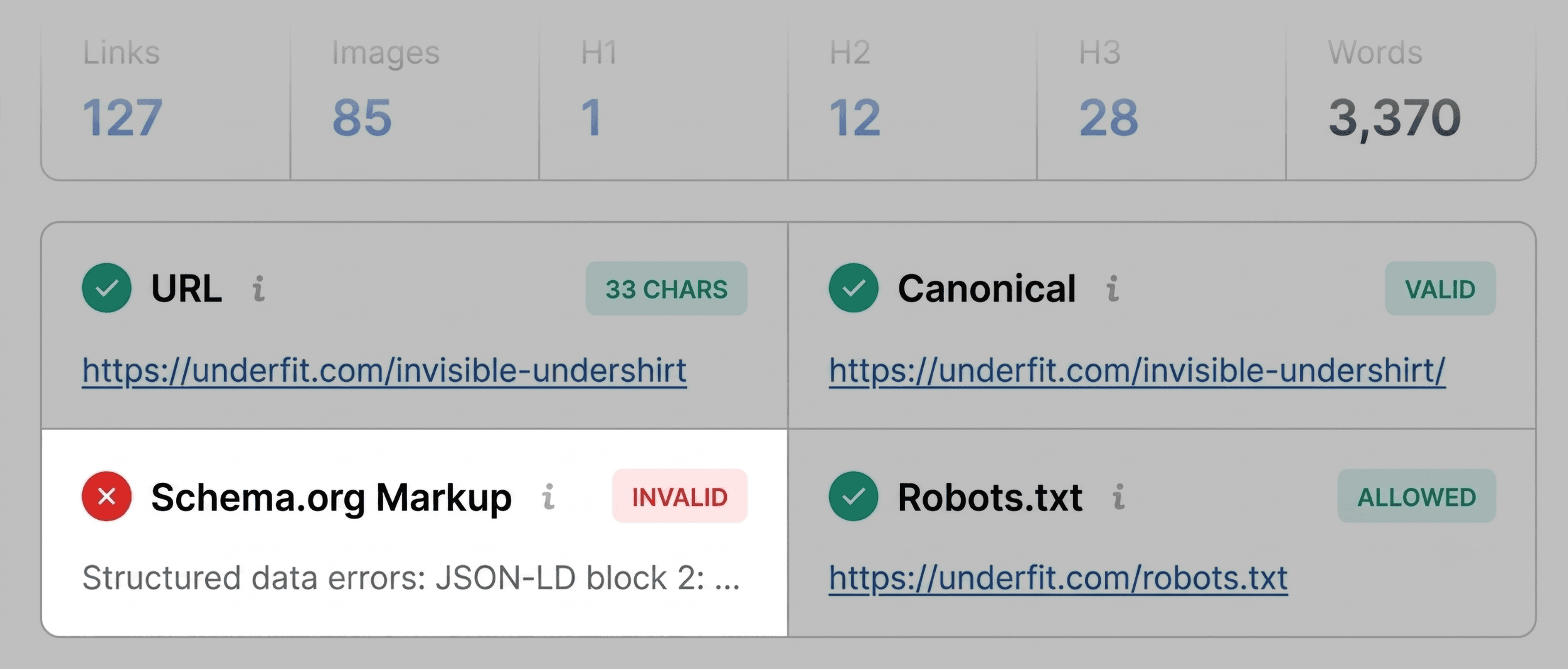
Some issues—such as missing canonical tags or problematic robots.txt directives—are not visible on the page surface. The Audit tab performs an automated sweep of these technical essentials. Even if the results appear largely green, look closely at the orange flags; they often reveal subtle misconfigurations that, when compounded, can dilute a page’s authority.

3. The Content Tab: Analyzing Structure
Content is not just about word count; it is about architecture. The Content tab allows you to inspect heading hierarchy and image alt-text usage. If your H1 tag is buried in the footer or if your images lack descriptive alt-text, you are actively hampering your page’s ability to rank in both standard search and AI-driven search environments.

Phase 2: The Two-Minute Diagnosis (The Full Report)
Once the triage is complete, you will likely have a list of "red" or "orange" flags. To move from observation to resolution, you must enter the Full Report by clicking "View Full Report" in the pop-up. This interface offers six distinct panels, each providing a granular look at the data collected.

Deep-Diving into Technical Hurdles
If your triage identified schema markup errors or sitemap issues, the Audit panel is your primary workspace. For example, if a product page returns "Invalid Schema," you are likely ineligible for Google’s rich results (like star ratings or price snippets). Clicking "Test in Rich Results" within this panel will bridge you directly to Google’s own diagnostic tools, confirming exactly which fields are broken.

Keyword Density and Semantic Relevance
The Keyword Density panel serves as a sanity check for your content strategy. It is not just about repetition; it is about relevance. By examining the "Keyword Cloud," you can see if your page is being indexed for the terms you intend. If a page about "premium leather shoes" shows "shipping" as its most prominent keyword, you have a content misalignment that needs to be addressed through copy revision.

Link Health: The Silent Killer
Broken links are a classic SEO oversight. The Links panel provides a comprehensive inventory of internal and external links. Seeing 30+ broken links on a single page is a major red flag that signals poor site maintenance to search engine crawlers. Exporting this data to a CSV file allows you to create a systematic repair plan.

Phase 3: The Implications of Your Audit
After three minutes of investigation, you should have a clear, prioritized to-do list. But how do you decide what to fix? This is where the Semrush Panel becomes indispensable.

By reviewing domain-level metrics—such as Authority Score and total backlink profile—you can determine the scope of the problem. If a page has poor performance despite the domain having high authority, the issue is almost certainly local to that specific page. If, however, your audit reveals site-wide issues like broken sitemaps or widespread schema failures, you have transitioned from a "page audit" to a "site audit."

When to Escalate to a Full Site Crawl
While SEOquake is an unparalleled tool for rapid, page-level assessment, it has limitations. It cannot crawl your entire site architecture or map out complex internal linking hierarchies. If your three-minute audit reveals systemic issues—such as duplicate content across 500 pages or a broken crawl path—you must escalate the process.

Using a tool like Semrush’s Site Audit allows you to scale the insights you gained from SEOquake. Where SEOquake identifies the "what" at a specific URL, a full-site audit identifies the "why" across your entire digital ecosystem.

Summary of Workflow
- 0:00–1:00: Use the Quick View to identify red-flag errors in metadata, technical tags, and content structure.
- 1:00–2:00: Use the Full Report to verify the specific causes of those flags (e.g., validating schema via the Rich Results tool).
- 2:00–3:00: Cross-reference your findings with the Semrush panel to determine if the fix is page-specific or requires a broader site-wide intervention.
Conclusion
In the modern SEO landscape, speed is a competitive advantage. By integrating SEOquake into your daily routine, you stop guessing why a page is underperforming and start fixing it. Whether you are an agency professional managing hundreds of pages or a business owner trying to optimize your own store, this three-minute workflow ensures you spend less time hunting for errors and more time driving growth.

Install SEOquake today and begin turning technical debt into tangible ranking improvements. For those ready to take the next step in site-wide optimization, a 14-day trial of Semrush Pro offers the robust, deep-crawl capabilities necessary to ensure your entire domain is firing on all cylinders.

Backlinko is owned by Semrush. We remain committed to providing world-class SEO insights, backed by hands-on experience. Unless otherwise noted, this content was authored by the professional editorial team at Semrush Inc.